
Keeping software fast, secure and healthy
A practical guide to keeping software and web apps fast, secure and reliable: what to measure, the tools that help, and a maintenance routine that stops small problems becoming outages.
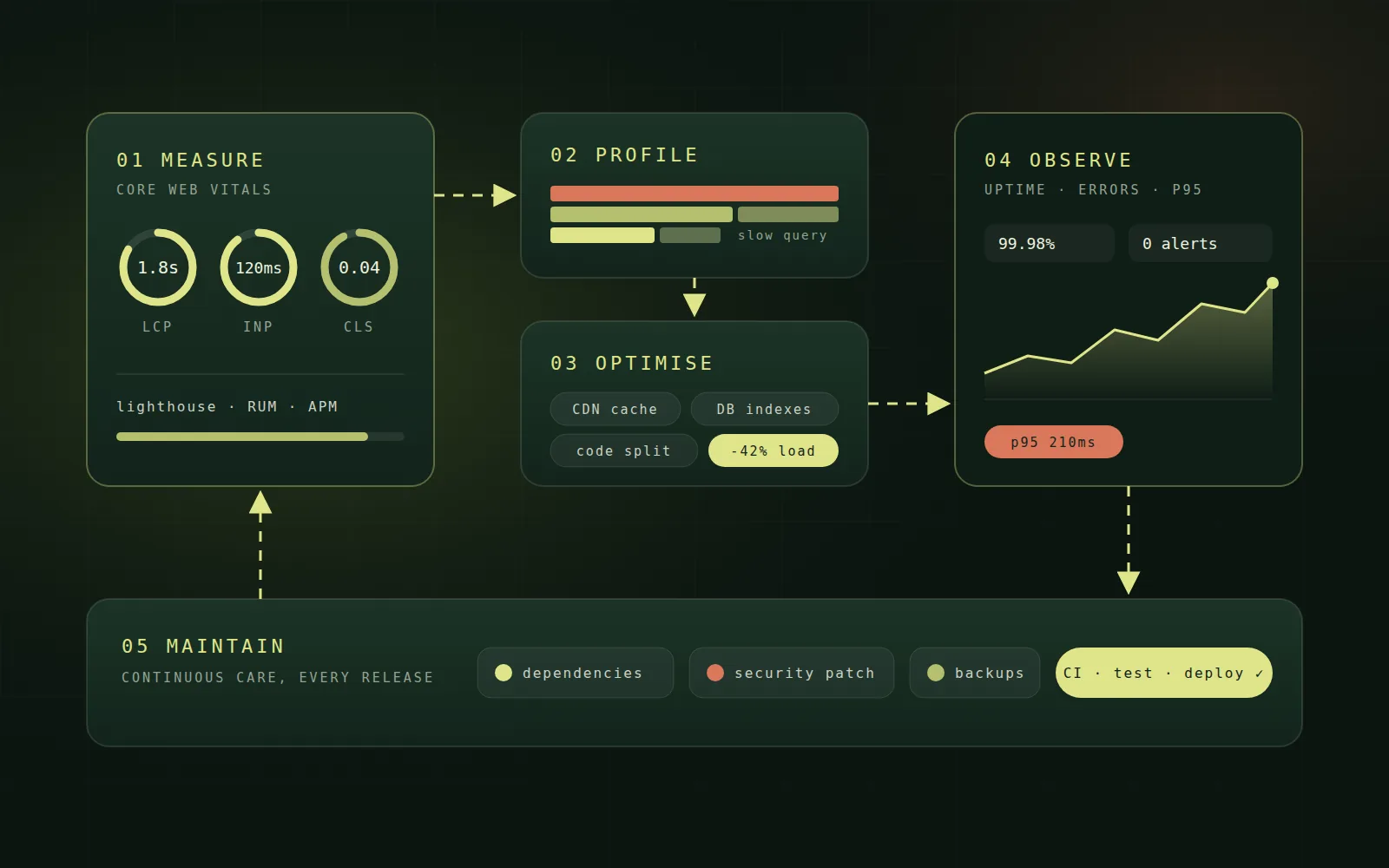
Launching software is the start of its life, not the end. Every application slows down, collects outdated dependencies and meets new security threats over time. The teams whose products stay fast and trustworthy treat optimisation and maintenance as a continuous routine rather than an emergency project. Here is how to build that routine, and the tools that make it practical today.
Start by measuring what users feel
Optimisation without measurement is guesswork. For web applications, Google's Core Web Vitals are the clearest starting point because they reflect real user experience and influence search ranking.
- Largest Contentful Paint (LCP) measures loading speed. Aim for under 2.5 seconds.
- Interaction to Next Paint (INP) measures responsiveness to taps, clicks and typing. Aim for under 200 milliseconds.
- Cumulative Layout Shift (CLS) measures visual stability. Aim for a score below 0.1.
Combine lab tools such as Lighthouse and WebPageTest with real user monitoring (RUM), which records how actual visitors experience the site on their own devices and networks. Lab tests help you find problems; real user data tells you which ones matter.
Profile before you optimise
Slow software is usually slow in a few specific places. Profiling finds them. Browser developer tools show long JavaScript tasks, render-blocking resources and oversized images. On the server, application performance monitoring (APM) tools such as OpenTelemetry-based tracing, Datadog or New Relic reveal slow endpoints, expensive database queries and external calls that hold everything up.
Fix the slowest thing users actually wait for. Everything else can wait.
Proven ways to make web applications faster
Once you know where time goes, a handful of techniques deliver most of the gains.
- Serve static assets through a CDN and cache aggressively with sensible expiry rules.
- Compress and resize images, use modern formats such as WebP and AVIF, and lazy-load anything below the fold.
- Split JavaScript bundles so each page loads only the code it needs, and remove unused libraries.
- Pre-render or server-render key pages so content appears before scripts finish loading.
- Add database indexes for frequent queries, avoid fetching more data than a screen displays, and cache expensive results.
- Move slow work such as emails, reports and media processing into background queues.
Monitor production around the clock
Performance and reliability need watching after every release, not just at launch. A good observability setup combines three signals: metrics for trends such as response time and error rate, logs for detail when something goes wrong, and traces that follow a single request across services. Add uptime checks from several regions and error tracking with a tool such as Sentry so crashes are reported with the exact code and user journey involved.
Set alerts on symptoms users would notice, such as rising error rates or slow p95 response times, rather than on every internal metric. Fewer, meaningful alerts get acted on; noisy ones get ignored.
A maintenance routine that prevents emergencies
Most outages and breaches trace back to routine work that was postponed. A simple, repeating schedule keeps software healthy.
- Weekly: review error reports, failed jobs and alerts, and apply critical security patches.
- Monthly: update dependencies with automated tools such as Dependabot or Renovate, and review performance dashboards.
- Quarterly: test backup restores, review access permissions, and remove unused features, services and accounts.
- Yearly: plan major framework and runtime upgrades before versions reach end of life.
Keep security part of maintenance
Security is the most important reason to maintain software. Scan dependencies for known vulnerabilities in every build, keep operating systems and runtimes patched, rotate secrets and API keys, and enforce HTTPS with modern security headers. Automated scanning tools such as pip-audit, npm audit and container image scanners catch problems early, when they are cheap to fix.
Automate releases with CI/CD
Manual deployments are slow and risky, which makes teams release less often and batch more changes together. A continuous integration and delivery pipeline runs tests, linting and security checks on every change, then deploys automatically. Small, frequent releases are easier to review, simpler to roll back and far less likely to cause outages. Add performance budgets to the pipeline so a change that makes pages noticeably slower fails the build.
Back up, and prove you can restore
A backup you have never restored is only a hope. Automate daily backups of databases and uploaded files, store copies in a separate location, and regularly restore them into a test environment. Document the recovery steps so anyone on the team can follow them under pressure.
Best tools for optimisation and maintenance in 2026
- Performance testing: Lighthouse, PageSpeed Insights and WebPageTest.
- Monitoring and tracing: OpenTelemetry, Grafana, Prometheus, Datadog or New Relic.
- Error tracking: Sentry or a similar crash reporting service.
- Dependency updates: Dependabot or Renovate.
- CI/CD: GitHub Actions, GitLab CI or AWS CodePipeline.
- Uptime checks: multi-region monitors with status pages and on-call alerts.
The best tool is the one your team will actually check. Start small, connect alerts to the people who can act on them, and expand once the basics are reliable.
Frequently asked questions
How often should a web application be maintained?
Continuously, with a rhythm: security patches as soon as they are released, dependency updates monthly, and a broader health review every quarter.
Does website speed affect SEO?
Yes. Core Web Vitals are part of Google's page experience signals, and faster pages also reduce bounce rates and improve conversions.
Which tools should a small team start with?
Begin with free essentials: Lighthouse and PageSpeed Insights for speed, an uptime monitor, Sentry for errors, Dependabot for updates and GitHub Actions for automated testing and deployment. Together they cover most risks before you need paid platforms.
Should we optimise or rebuild?
Optimise first. Measuring and fixing the slowest parts usually delivers most of the benefit at a fraction of the cost. Rebuild only when the architecture itself blocks progress.
Well-maintained software stays fast, secure and ready for what comes next. With clear measurements, a few reliable tools and a steady routine, optimisation and maintenance become ordinary work rather than a crisis.