
Vector databases, explained for product teams
How embeddings, vector indexes and similarity search work together, and how to design a vector database layer that keeps AI answers fast, relevant and private.
Search used to mean matching words. Modern AI products need something different: finding information that means the same thing, even when it uses different words. Vector databases make that possible. They sit at the heart of semantic search, recommendations and retrieval-augmented generation (RAG), and they are quickly becoming a standard part of the application stack.
From words to vectors
An embedding model turns a piece of content, such as a paragraph, an image or a product description, into a list of numbers called a vector. Content with similar meaning produces vectors that sit close together in this high-dimensional space. A question about "resetting a password" lands near a help article titled "recover your account", even though the two share almost no words.
A vector database stores these vectors alongside the original content and metadata, and answers one core question very quickly: which stored items are closest to this new vector?
How similarity search works
Closeness is measured with a distance function. Cosine similarity compares the angle between vectors and is the most common choice for text. Dot product and Euclidean distance are also widely used, and the right choice depends on how the embedding model was trained.
Comparing a query against every stored vector is exact but slow once a collection grows. Vector databases therefore use approximate nearest neighbour (ANN) indexes that trade a tiny amount of accuracy for very large gains in speed.
- HNSW builds a layered graph that lets a search hop quickly towards the nearest neighbours. It is fast and accurate but uses more memory.
- IVF groups vectors into clusters and searches only the most promising clusters for each query.
- Product quantization compresses vectors so far larger collections fit in memory, at some cost to precision.
Where vector databases fit in RAG
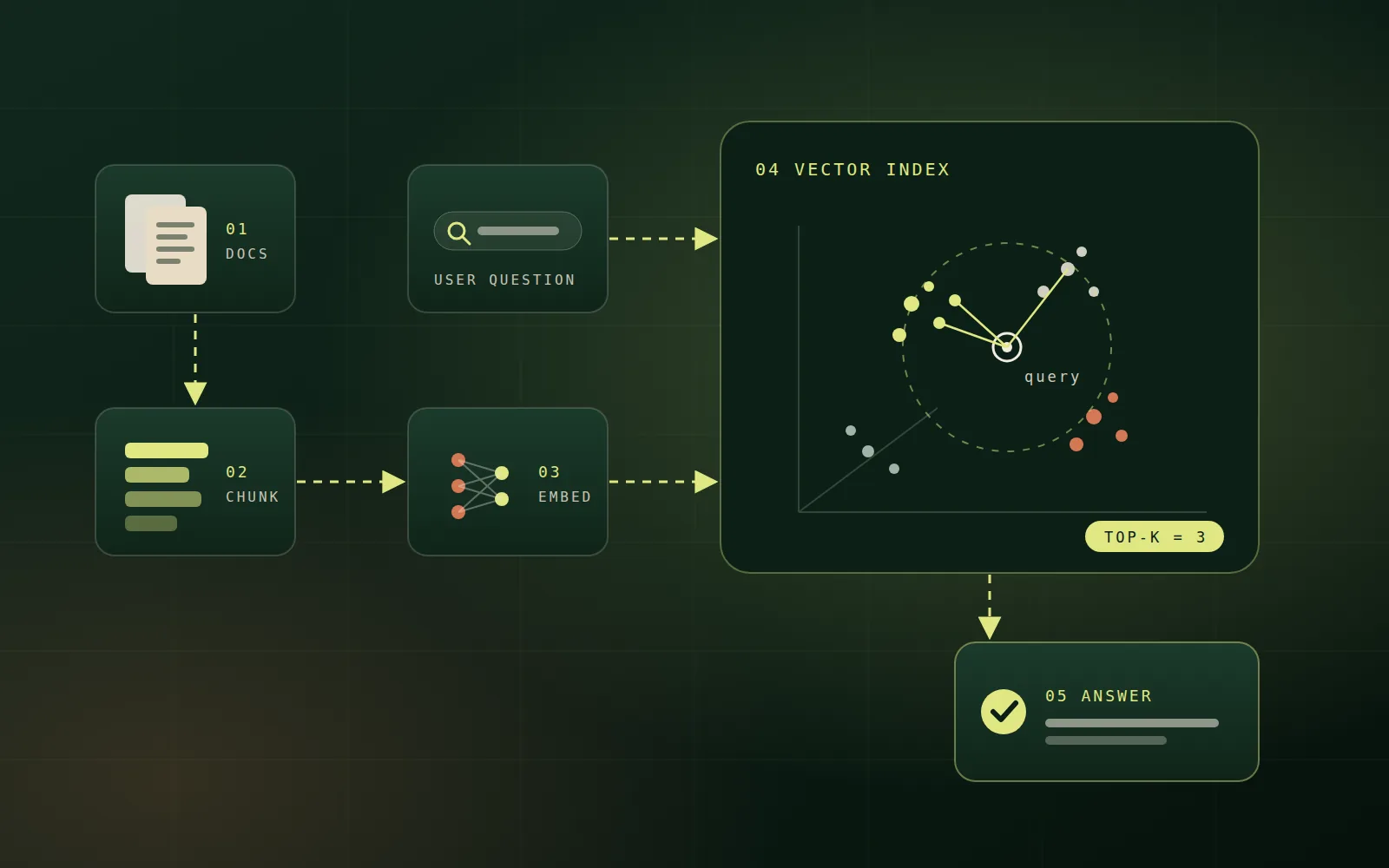
In a retrieval-augmented generation system, the vector database is the memory. Documents are split into chunks, each chunk is embedded and stored, and every user question is embedded the same way. The closest chunks are retrieved and handed to a language model as context, so its answer is grounded in your own sources rather than its general training data.
The quality of a RAG answer is decided long before the model writes a word: it is decided by what retrieval finds.
Design decisions that matter
Most of the work in a good vector search system happens around the database rather than inside it.
- Chunking: split content along natural boundaries such as headings and paragraphs, with a little overlap so meaning is not cut in half.
- Embedding model: choose one suited to your language, domain and content type, and re-embed everything if you change it, because vectors from different models are not comparable.
- Metadata: store source, date, product, language and access level with every vector so searches can be filtered precisely.
- Top-k: retrieve enough candidates to cover the answer, then re-rank them so only the most relevant reach the model.
Hybrid search beats either method alone
Semantic search understands meaning but can miss exact terms such as product codes, error messages or names. Keyword search is the opposite. Hybrid search runs both and merges the results, which consistently produces better retrieval for real business content. Many vector databases now support this natively, and it is one of the simplest upgrades to an existing RAG system.
Security and multi-tenancy
A vector index can leak information just as easily as a database table. Every query should be filtered by what the current user is allowed to see, enforced at the retrieval layer rather than trusted to the prompt. For products serving many customers, separate collections or strict tenant filters keep one organisation's data out of another's answers. Deleting a document must also delete its vectors, which matters for privacy requests.
Choosing a vector database
Options range from vector extensions inside existing databases, such as pgvector for PostgreSQL, to dedicated managed vector services and open-source engines you host yourself. The right choice depends on scale, latency targets, filtering needs and how much infrastructure your team wants to operate.
- Start inside your existing database when collections are modest and you value simple operations and transactions.
- Move to a dedicated engine when you need billions of vectors, very low latency, or advanced features like built-in hybrid search and quantization.
- Benchmark with your own data and real queries, because published benchmarks rarely match production workloads.
Keeping the index healthy
A vector index is not a one-off import. Content changes, so pipelines must embed new documents, update edited ones and remove deleted ones automatically. Monitor search latency, index size and memory, and periodically re-evaluate retrieval quality with a fixed set of real questions. When a better embedding model appears, plan a full re-index rather than mixing old and new vectors.
Beyond text
Embeddings exist for images, audio, code and even spatial data. The same database can power visual search across product photos, find similar support tickets, recommend related articles, or connect 3D site captures to inspection reports. Multimodal embedding models place text and images in a shared space, so a written question can retrieve a relevant photo.
Measuring success
Judge a vector search system by outcomes, not by the database alone. Track whether the right document appears in the top results for real questions, how often users rephrase a search, and how often an AI answer cites the correct source. Small, regular evaluations catch quality drift long before customers notice it.
Getting started
- Pick one focused use case, such as internal documentation search or a support assistant.
- Collect a test set of real questions with the documents that should answer them.
- Build the ingestion pipeline first: clean content, chunk it well and attach metadata.
- Add hybrid search and re-ranking before reaching for a larger model.
- Enforce access control at retrieval time from day one.
Vector databases turn meaning into something software can search. Designed carefully, they make AI features faster, more accurate and more trustworthy, and they give your product a memory that grows with your knowledge.